Complete user journeys
Connect onboarding, the core task and follow-up in a coherent experience. Include loading, empty, error and recovery states across devices and assistive technology.

Solution workflow
Prepare and coordinate social content with editorial approval and platform-specific publishing rules.
Prepare and coordinate social content with editorial approval and platform-specific publishing rules.
The work, in detail
Teams repeat the same formatting, scheduling and reporting work across multiple channels.
Agree the operating rules first, then introduce automation in reviewable stages.
Use draft channel-specific content from an approved brief within the agreed scope of autonomous multi-platform social media management engines. Define the responsible owner, the relevant source records and the checks that make the output useful.
Use check brand guidance and route drafts for approval within the agreed scope of autonomous multi-platform social media management engines. Define the responsible owner, the relevant source records and the checks that make the output useful.
Use schedule approved posts and collect reporting signals within the agreed scope of autonomous multi-platform social media management engines. Define the responsible owner, the relevant source records and the checks that make the output useful.
Approved account access, editorial review, content rights and a publishing calendar. Public posts require approval before release.
Compare representative examples with the current process. Review exceptions, correction effort, source traceability and handoff quality before expanding scope.
What takes shape
Final scope is agreed after discovery. These are the working outputs we can shape around your context.
Define the records, permissions and interfaces needed for channel-specific drafts. Review a working example with the process owner before widening scope.
Connect approval and scheduling records to a named reviewer and an action path. Include empty states, incomplete records and recovery behaviour in acceptance checks.
Document the production, review and maintenance of campaign reporting signals. Keep the handover practical for the people supporting the system.
A connected delivery path
Establish the source records and the intended result. For Autonomous Multi-Platform Social Media Management Engines, confirm the input quality and permission boundaries before processing.
Connect the approved sources and apply the task-specific checks. Keep missing information and uncertain results visible for review.
Review representative outputs and exceptions with the accountable owner. Agree what may proceed and what requires correction or escalation.
Prepare for a useful conversation
Bring representative approved campaign brief and brand guidance. Use synthetic or approved records when exploring the workflow; agree handling rules before live data is introduced.
Identify the business owner and the people who will use or review the output. For Autonomous Multi-Platform Social Media Management Engines, confirm who can approve changes and resolve exceptions.
Describe what works today, where it breaks down and how the proposed workflow will be reviewed. Compare quality and correction effort as well as speed.
Products and platform engineering
A reliable product connects interfaces, data, permissions and operations. Shape delivery around complete user journeys and the failure cases that occur outside a polished demonstration.
Connect onboarding, the core task and follow-up in a coherent experience. Include loading, empty, error and recovery states across devices and assistive technology.
Define entities, validation and API boundaries before expanding features. Plan migrations, duplicate handling and backwards compatibility with existing consumers.
Create a repeatable delivery path with environment separation, observability and rollback. Hand over runbooks alongside working software.
Define success before delivery
Choose a representative sample, record the current baseline and agree who accepts the result. These are evaluation criteria to discuss, rather than promised outcomes.
Completion of critical journeys and recovery paths
Reliability, accessibility and performance budgets
Release repeatability and operational ownership
A prototype demonstrates an interaction or architecture; it is not automatically production-ready. Security, scale, integration and operational acceptance need their own evidence.
Inside Content Planning & Approval Workflows
Approved source material
Integration scope to confirm
Outputs to agree in discovery
From the project library
Explore the product patterns and operating context relevant to content planning & approval workflows. Each profile explains its own scope and stage; adjacent examples do not imply the same solution has already been delivered.
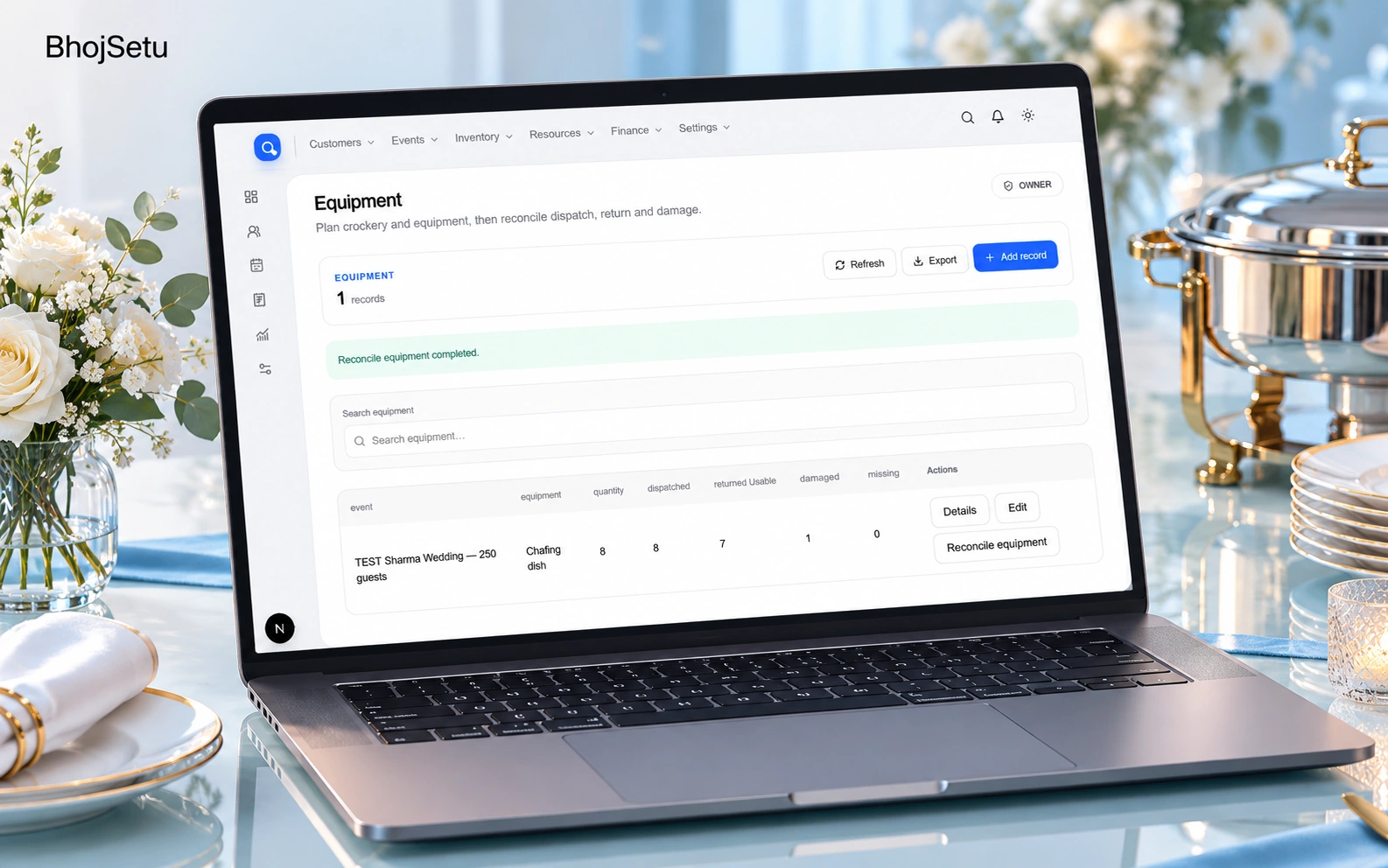
Pilot · AI presentation artwork · screen reference
A connected catering workspace brings bookings, menus, recipe scaling, procurement, workers, equipment and billing into one flow.
Catering teams repeat event, menu, quantity and payment data across disconnected operational steps.

Prototype · AI presentation artwork · screen reference
A static product preview combines a production-resource directory with a project dashboard for shoot operations.
Production teams coordinate resource discovery, budgets, schedules and communication across disconnected channels.

Backend platform · AI concept visualization · project scope
A Laravel backend models employer and job-seeker profiles, job records, skills, education and account access.
A hiring platform needs shared records for employers, candidates, jobs and access permissions.
Project profiles describe their available scope and development stage. Interface captures, documentation and workflow concepts are labelled separately; they are not claims of measured business results.
Before we begin
Start with the current task, its owner and the systems involved. Representative approved campaign brief, brand guidance, account access, editorial calendar help us assess scope. A finished technical brief is not required.
Scope is agreed after discovery. A useful starting point is channel-specific drafts, with the essential review path and an acceptance check. Approval and scheduling records and Campaign reporting signals can follow where the operating case supports them.
We assess commerce platforms, inventory apis, approved messaging channels for permitted access and usable interfaces. Integration feasibility, data quality and ownership are confirmed before implementation commitments.
Agree examples, failure cases and acceptance criteria before the build. Review source traceability, correction effort, access boundaries and the handover into everyday operations. We do not promise a fixed saving or performance figure before that assessment.